

Top 5 Best AI Chrome Extensions Speed Up Blogging 2026
Introduction
Blogging in 2026 is no longer just about typing words and hitting publish. Today, successful bloggers need to write smarter, faster, and more strategically to stand out. With countless bloggers competing for attention online, producing high-quality content efficiently has become essential. Fortunately, Chrome extensions for blogging have transformed the way bloggers create content.
These AI-powered writing and editing tools for bloggers allow you to generate ideas, draft posts, edit content, optimize for SEO, and manage your publishing workflow—all directly from your browser. Whether you are a beginner or an experienced content creator, these top AI tools to write high-quality blog posts can save hours of work while improving content quality and readability.
In this detailed guide, we’ll explore the best AI Chrome extensions to speed up blogging in 2026. You’ll discover their key features, pros and cons, real-life examples, and a comparison table to select the right tools for your workflow. Plus, we’ll share bonus tips, common mistakes to avoid, and FAQs so you can maximize the power of these tools.
Top 5 AI Chrome Extensions for Blogging
1. GrammarlyGO
Website: www.grammarly.com
Features:
-
Real-time grammar, spelling, and punctuation correction
-
AI-powered tone detection and suggestions
-
Auto-complete for faster content creation
-
Works seamlessly on Gmail, Google Docs, WordPress, and most web editors
Pros:
-
User-friendly and intuitive interface
-
Improves clarity, readability, and tone
-
Saves significant editing time
Cons:
-
Free plan offers limited functionality; premium required for advanced features
How to Use:
-
Install the Grammarly Chrome extension.
-
Enable “GrammarlyGO” from the settings menu.
-
Begin drafting your blog in Google Docs or WordPress. GrammarlyGO will provide real-time suggestions, automatic completions, and tone enhancements.
Real-Life Example:
A blogger drafting a 1,500-word article in Google Docs can rely on GrammarlyGO to polish grammar, correct sentence structure, and adjust tone. This reduces editing time by nearly 50%, allowing the blogger to focus on content strategy and audience engagement.

2. ChatGPT for Google
Website: chat.openai.com
Features:
-
Shows AI-generated ChatGPT responses alongside Google search results
-
Powered by GPT-4 for faster, richer, and more accurate answers
-
Helps bloggers create outlines, generate content ideas, and collect research notes
Pros:
-
Saves hours of manual research and brainstorming
-
Provides instant examples, explanations, and topic insights
-
Integrates smoothly with Google search for seamless workflow
Cons:
-
Requires an active OpenAI account login
How to Use:
-
Install the ChatGPT for Google Chrome extension.
-
Open Google and search for any blog topic.
-
View ChatGPT suggestions in the sidebar to quickly plan and outline your blog post.
Real-Life Example:
A lifestyle blogger writing about “sustainable fashion tips” can instantly see AI-generated headings, subtopics, and FAQs in the sidebar. This not only speeds up content planning but also ensures the post is well-structured and comprehensive.

3. HyperWrite AI
Website: www.hyperwriteai.com
Features:
-
Real-time AI-powered content generation for faster writing
-
Paragraph auto-completion to streamline drafting
-
Rewriting, tone adjustment, and content idea suggestions
-
Supports email creation, outlines, and call-to-action (CTA) generation
Pros:
-
Perfect for writing intros, conclusions, and CTAs quickly
-
Minimalistic, distraction-free interface for focused writing
-
Works on almost any website via a Chrome extension for blogging
Cons:
-
Free plan has word limits; advanced features require a subscription
How to Use:
-
Install the HyperWrite AI Chrome extension.
-
Open your preferred blog editor, like WordPress or Google Docs.
-
Start drafting a paragraph and use HyperWrite AI to get suggestions for completions, rephrased sentences, or new content ideas.
Real-Life Example:
A tech blogger experiencing writer’s block while covering “AI trends in 2026” can input a draft paragraph and instantly receive 3–4 alternative ways to continue. This helps produce high-quality content faster and with a natural flow.
4. Wordtune
Website: www.wordtune.com
Features:
-
AI-powered sentence rephrasing to enhance clarity and style
-
Adjust tone: casual, formal, or neutral for your audience
-
Shorten or expand sentences to improve readability
-
Seamlessly integrates with Google Docs, Notion, and WordPress
Pros:
-
Ideal for polishing and refining content
-
Improves overall readability, flow, and engagement
-
Offers customizable tone options for different types of blog posts
Cons:
-
Full set of features requires a Pro subscription
How to Use:
-
Install the Wordtune Chrome extension from the Web Store.
-
Highlight any sentence in your blog draft.
-
Click the Wordtune icon to view AI-generated alternatives and choose the best phrasing.
Real-Life Example:
A health blogger can transform a long, technical paragraph into a concise, easy-to-read version suitable for online readers. This ensures content is engaging, polished, and easier for the audience to digest.
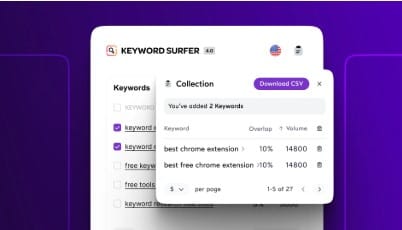
5. Surfer SEO Extension
Website: www.surferseo.com
Features:
-
Provides real-time SEO audits for blog content
-
Checks keyword density and placement for optimization
-
Offers outline suggestions and actionable SEO tips
-
Integrates seamlessly with Google Docs and WordPress
Pros:
-
Helps your content rank faster on search engines
-
Provides guidance on keyword placement, headings, and structure
-
Ideal for optimizing long-form blog posts
Cons:
-
Full content editor and advanced features require a premium subscription
How to Use:
-
Install the Surfer SEO Chrome extension.
-
Open your draft in Google Docs or WordPress.
-
Follow the live suggestions for headings, keywords, meta descriptions, and content length to optimize your post for search engines.
Real-Life Example:
A travel blogger writing about “Best Beach Destinations in 2026” can use Surfer SEO to ensure all relevant keywords, headings, and meta descriptions are properly optimized. This not only improves search engine ranking but also ensures the post is structured and easy to read for the audience.
AI Blogging Tools Comparison Table
| Extension | Main Feature | Best For | Free Plan Limitations | Platforms Supported |
|---|---|---|---|---|
| GrammarlyGO | Grammar, tone, AI writing | All bloggers | Limited advanced features | Docs, Gmail, WordPress |
| ChatGPT for Google | Research, outlines | Idea generation | Account login required | Google Search |
| HyperWrite AI | Content generation, rephrasing | Writing & drafting | Word limit in free plan | Any web editor |
| Wordtune | Sentence rephrasing | Editing & readability | Pro features locked | Docs, WordPress, Notion |
| Surfer SEO | SEO optimization | SEO-focused blogs | Limited editor features | Docs, WordPress |
Bonus Tips for Maximum Productivity with AI Chrome Extensions for Blogging
Using Chrome extensions for blogging effectively can transform your workflow, saving time while improving content quality. The key is to combine these tools strategically, batch tasks efficiently, and customize AI suggestions to match your unique voice. Here’s how to maximize the potential of the best AI Chrome extensions to speed up blogging.
1. Combine Tools for Maximum Efficiency
Each AI tool has its own strengths, and using them together creates a seamless content creation process:
-
ChatGPT for Google and HyperWrite AI: Use these to quickly generate blog outlines, draft paragraphs, and brainstorm content ideas. This is particularly useful for overcoming writer’s block and ensuring your posts cover all essential topics.
-
GrammarlyGO and Wordtune: Once your draft is ready, refine your content with these AI-powered writing and editing tools for bloggers. They enhance readability, polish grammar, adjust tone, and make your writing more engaging.
-
Surfer SEO Extension: Optimize your content for search engines by checking keyword placement, headings, meta descriptions, and overall structure. This ensures your blog posts are both user-friendly and SEO-ready.
By strategically combining these top AI tools to write high-quality blog posts, you can move from ideation to publishing more efficiently than ever.
2. Batch Your Tasks
Efficient bloggers understand the power of batching tasks. Using AI tools in structured sessions boosts productivity and reduces distractions:
-
Day 1 – Research and Outline: Use ChatGPT for Google or HyperWrite AI to generate topic ideas, outlines, and FAQs.
-
Day 2 – Drafting: Draft the entire blog post using AI-assisted tools. HyperWrite AI can help with paragraph completion, introductions, conclusions, and CTAs.
-
Day 3 – Editing and SEO: Refine your content with GrammarlyGO and Wordtune, adjusting tone and flow. Then, use Surfer SEO to optimize for search engines, ensuring headings, keywords, and meta details are accurate.
Batching tasks allows you to focus deeply on each stage of content creation, rather than constantly switching between tools and tasks. This workflow is particularly effective when using AI-powered writing and editing tools for bloggers to create polished, high-quality content.
3. Customize AI Suggestions
While AI tools can dramatically speed up blogging, they are best AI Chrome extensions to speed up blogging, not replacements for your personal voice.
-
Always review AI-generated suggestions to ensure they align with your style, brand, and audience expectations.
-
Adjust tone, phrasing, and sentence structure to create content that resonates authentically with your readers.
-
Use AI as a productivity enhancer—accept suggestions that improve clarity or SEO but maintain originality in ideas and storytelling.
Remember, your unique perspective is what sets your blog apart. AI is there to support your creativity and efficiency, not replace it.
Common Mistakes to Avoid When Using AI-Powered Writing and Editing Tools for Bloggers
Even the most advanced Chrome extensions for blogging can’t guarantee perfect results if misused. Avoid these common pitfalls:
1. Relying Entirely on AI
AI can generate drafts and suggestions, but it cannot replicate human creativity, insight, or personal experience. Originality and authenticity remain critical for building a loyal audience. Treat AI as a tool to enhance your workflow, not a substitute for your unique ideas.
2. Skipping SEO Checks
Even high-quality content must be optimized for search engines. Tools like Surfer SEO help ensure your posts are search-engine-friendly, with proper keyword usage, headings, and meta descriptions. Neglecting SEO can result in poor visibility, regardless of content quality.
-
Ignoring tone and readability
-
AI may not perfectly capture your audience’s voice, so always review and refine output for clarity and engagement.
-
-
Overusing keywords
-
Keyword stuffing reduces readability and can harm search rankings. Use AI suggestions wisely.
-
-
Not experimenting with tools
-
Each AI Chrome extension for blogging has unique strengths. Test different combinations to find the workflow that maximizes productivity.
-
FAQs About AI Chrome Extensions for Blogging
Q1. Are these Chrome extensions for blogging free?
Most of the best AI Chrome extensions to speed up blogging offer free plans that include basic features, such as grammar correction, sentence rephrasing, or limited AI content generation. However, advanced capabilities—like full AI-powered writing, SEO optimization, content expansion, and detailed analytics—usually require a premium subscription. For bloggers serious about efficiency and high-quality output, investing in a Pro plan can dramatically save time and enhance content quality.
Q2. Can AI-powered writing and editing tools for bloggers replace human bloggers?
No. While AI-powered writing and editing tools for bloggers can streamline content creation, they cannot replace human creativity, personal experiences, or storytelling skills. AI is designed to assist bloggers by generating ideas, suggesting improvements, and speeding up repetitive tasks. The real value comes from combining AI efficiency with your unique voice and insights, producing content that resonates with your audience.
Q3. Do these AI Chrome extensions work on mobile?
Most top AI tools to write high-quality blog posts are optimized for desktop browsers, as full content creation and editing typically require larger screens. However, some extensions provide limited functionality through mobile-friendly web versions or dedicated apps. For on-the-go blogging, you can use AI tools to draft ideas or review suggestions but may need a desktop environment for final content production and SEO optimization.
Q4. How can I use multiple tools together effectively?
To maximize productivity using Chrome extensions for blogging, it’s best to combine their strengths in a structured workflow:
-
Idea generation and research: Use ChatGPT for Google to quickly collect topic ideas, FAQs, and outlines.
-
Drafting: Use HyperWrite AI to generate paragraphs, write introductions and conclusions, and overcome writer’s block.
-
Editing and polishing: Use GrammarlyGO and Wordtune to refine grammar, tone, and readability.
-
SEO optimization: Use Surfer SEO to check keyword placement, headings, and meta descriptions to improve search engine rankings.
This combination ensures your blog posts are not only high-quality and engaging but also optimized for search visibility.
Q5. Will using AI affect Google rankings?
No, AI-generated content itself does not harm Google rankings. What matters most is quality, originality, and proper SEO optimization. Google prioritizes content that is informative, well-structured, and user-friendly. Using AI-powered writing and editing tools for bloggers can help you meet these standards faster by improving readability, keyword placement, and structure, as long as the content remains unique and valuable to your readers.
Q6. Are AI Chrome extensions suitable for all types of bloggers?
Absolutely. Whether you are a lifestyle, tech, health, travel, or finance blogger, these top AI tools to write high-quality blog posts can enhance your workflow. For example:
-
Lifestyle bloggers can use AI to generate trendy content ideas or optimize headlines for click-throughs.
-
Tech bloggers can leverage AI to draft tutorials, product reviews, or explain complex concepts in simpler terms.
-
Travel bloggers can save hours on research and SEO optimization for destination guides.
Conclusion: Why You Should Use AI-Powered Chrome Extensions for Blogging
In 2026, blogging is evolving at lightning speed. Simply writing content is no longer enough; bloggers need to create high-quality, SEO-optimized posts quickly to compete in an increasingly crowded space. This is where Chrome extensions for blogging and AI-powered writing and editing tools for bloggers become essential.
Tools like GrammarlyGO, ChatGPT for Google, HyperWrite AI, Wordtune, and Surfer SEO are among the best AI Chrome extensions to speed up blogging. Here’s how they can transform your blogging workflow:
-
Save Time: Draft, edit, and optimize content in a fraction of the time it would take manually.
-
Improve Quality: Ensure your grammar, tone, and readability are flawless with AI suggestions.
-
Boost SEO: Optimize keywords, headings, and meta descriptions to rank higher on search engines.
-
Enhance Creativity: Overcome writer’s block and generate fresh ideas using AI-powered content suggestions.
By strategically combining these top AI tools to write high-quality blog posts, you can achieve a seamless workflow: generate ideas, draft efficiently, polish content, and optimize SEO—all within your browser. AI acts as a productivity booster, letting you focus on your unique voice, creativity, and audience engagement.
Real-Life Impact
For example, a travel blogger writing about “Top Beach Destinations in 2026” can use ChatGPT to create a structured outline, HyperWrite AI to draft engaging paragraphs, GrammarlyGO and Wordtune to refine language, and Surfer SEO to ensure the post is optimized for Google search. A task that might traditionally take 8–10 hours can now be completed in just 2–3 hours with better quality and SEO results.
Key Takeaways
-
Use AI as an assistant, not a replacement. Your unique perspective and creativity remain the most valuable aspect of your content.
-
Combine tools for efficiency. Each Chrome extension brings its own strengths—mix and match to create a workflow that works for you.
-
Focus on quality and SEO. AI can speed up blogging, but content must still be accurate, readable, and optimized for search engines.
-
Experiment and adapt. Test different AI tools and strategies to find what best supports your blogging style and niche.
By embracing these AI-powered writing and editing tools for bloggers, you can elevate your content, save time, and stay ahead in 2026’s competitive blogging landscape. Start integrating these tools into your workflow today, and watch your blogging productivity and quality soar.