
Top 6 Free Apps to Remove Background from Photos in 2026
📌Introduction: Why Students and Creators Need Free Background Remover Tools
In 2026, visuals play a crucial role in education, content creation, and online business. Whether you’re designing social media posts, creating YouTube thumbnails, or preparing study presentations, images with transparent backgrounds instantly look professional and polished. For students and aspiring creators, professional software like Adobe Photoshop can be expensive and complicated. That’s where the best free background remover apps for students come in—they allow you to edit photos quickly, with no watermark background remover options.
These tools automatically separate the subject from the background, making it easy to create clean, versatile images. You can use them for:
Designing eye-catching social media graphics
Making professional YouTube thumbnails
Preparing digital notes, presentations, or study slides
Creating product mockups for online stores
While many apps claim to remove backgrounds, most hide features behind paywalls or add unwanted watermarks. On sociallif.com, we’ve compiled a guide featuring tools that let you remove background from photos free with simple steps, beginner-friendly interfaces, and high-quality results.
In this guide, you’ll discover:
Top 6 free background remover apps for students
Step-by-step instructions for each tool
Pros and cons of every app
Real-life examples from students and creators
A detailed comparison table
FAQs and bonus tips to maximize efficiency
Let’s explore the best free background remover apps you can start using today for professional-quality images with no watermarks.
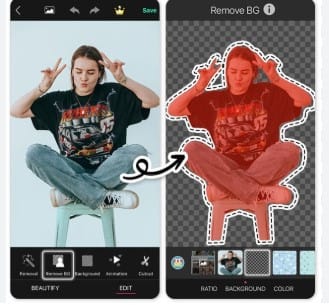
🎨Top 6 Free Background Remover Apps for Students
1. Remove.bg – Fast & Easy One-Click Background Remover
Website: Remove.bg
Why it’s great: Remove.bg is one of the best free background remover apps for students who want professional-looking images without complicated software. With just one click, you can remove background from photos free in seconds, making it ideal for beginners. No editing skills are required, and it works perfectly on both mobile devices and desktops.
Pros:
One-click background removal
Supports JPG, PNG, and WebP formats
Mobile and desktop-friendly
Produces clean results with no watermark in standard resolution
Cons:
High-resolution downloads require login
Free version provides only standard resolution
How to Use Remove.bg:
Visit Remove.bg
Upload your image
Download your image with a transparent background (standard resolution is watermark-free)
Student Example:
Zara, a university student and Etsy seller, uses Remove.bg to quickly crop product images for her digital sticker shop. By saving hours on editing, she focuses more on promoting her products and growing her store.
Best For: Students, beginners, Etsy sellers, quick photo mockups
Tip from sociallif.com: For students creating content for presentations, social media, or online stores, Remove.bg is a fast, reliable solution when you need a no watermark background remover without paying for premium software.

🟣2. Canva Background Remover – Free with Trial
Website: Canva
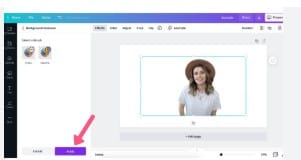
Why it’s helpful: Canva is one of the best free background remover apps for students, combining how to remove background from photos free with powerful design features. Its drag-and-drop editor makes creating social media posts, YouTube thumbnails, and presentations easy. Normally a Pro feature, students can access it using Canva’s 30-day free trial.
Pros:
User-friendly drag-and-drop interface
Free templates for social posts, resumes, and thumbnails
Integrates seamlessly with Canva’s other design tools
Allows no watermark background remover export during the trial
Cons:
Background remover is part of Canva Pro (trial is temporary)
How to Use Canva Background Remover:
Sign up for the Canva Pro free trial
Upload your photo
Click the image → “Edit Image” → “Background Remover”
Export your photo as PNG with a transparent background
Pro Tip: Cancel your trial before 30 days to avoid charges—you retain all your designs.
Student Example:
Ali, a media student, creates professional YouTube thumbnails using Canva. By removing backgrounds cleanly and adding custom graphics, his thumbnails now attract more clicks, improving engagement significantly.
Best For: Students, content creators, YouTubers, bloggers
Tip from sociallif.com: Canva is an excellent choice for students who want a no watermark background remover combined with complete design flexibility, making it a top option for both school projects and social media content.
Sell Digital Stickers Online Without Investment 2026
🔵3. PhotoRoom – Mobile-Friendly Background Remover
Website: PhotoRoom
Why it’s useful: PhotoRoom is one of the best free background remover apps for students who prefer working from their mobile devices. It allows you to remove background from photos free automatically, while also offering stylish templates for social media posts, product photos, and online portfolios.
Pros:
Works on iOS and Android
Ready-made templates for Instagram, online stores, and social posts
Quick, beginner-friendly workflow
Provides clean results that can be made no watermark background remover with minor cropping
Cons:
Free version adds a small watermark (can easily be cropped)
How to Use PhotoRoom:
Download and install the PhotoRoom app
Select the image you want to edit
The app automatically removes the background
Download your image (crop watermark if needed for a clean result)
Student Example:
Many students and freelancers on Fiverr use PhotoRoom to showcase product samples, logos, and social media visuals efficiently. Its mobile-first design saves time while producing professional-looking results.
Best For: Students, mobile-first users, freelancers, social sellers
Tip from sociallif.com: For students looking for a no watermark background remover on mobile, PhotoRoom is a fast, reliable solution, especially when you want polished images for social media or online stores without using a computer.

🔶4. Pixlr – AI Background Removal with Manual Control
Website: Pixlr
Why it’s great: Pixlr is one of the best free background remover apps for students, offering both automatic AI removal and manual brush tools for precise editing. It’s browser-based, so there’s no need to install software, making it easy to remove background from photos free anytime, anywhere.
Pros:
Automatic and manual background removal options
Produces no watermark background remover results
Free to use and highly versatile
Browser-based, works on both PC and mobile
Cons:
Requires a stable internet connection
How to Use Pixlr:
Open Pixlr’s background remover tool in your browser
Upload your image
Use auto-remove or refine edges with the manual brush tool
Save the final image as PNG with a transparent background
Student Example:
Sara, an architecture student, uses Pixlr to remove backgrounds and refine her project visuals. The manual tools allow her to perfect portfolio images for online submissions and presentations.
Best For: Students, artists, creative professionals, portfolio designers
Tip from sociallif.com: Pixlr is ideal for students who want precise control and a no watermark background remover, especially when automatic tools don’t perfectly cut out details like hair or intricate edges.
🔺5. Slazzer – Bulk Background Removal for Students and Sellers
Website: Slazzer
Why it’s helpful: Slazzer is one of the best free background remover apps for students and small business owners who need to process multiple images quickly. It allows users to remove background from photos free in bulk, making it perfect for e-commerce listings, social media graphics, and portfolio projects.
Pros:
Desktop version supports batch editing for multiple images at once
API available for automation
Saves time for students running online stores or freelance projects
Produces clean, high-quality images with no watermark in standard downloads
Cons:
High-resolution downloads require creating an account
Student Example:
Hassan, a student selling phone accessories online, uses Slazzer to edit over 100 product images each month. By automating background removal, he saves hours of manual work while keeping his listings professional and visually appealing.
Best For: Students, e-commerce sellers, bulk image editing, social media content creators
Tip from sociallif.com: Slazzer is perfect for students or small business owners who need a no watermark background remover for multiple images at once, especially when time is limited.

🟡6. Fotor – Fast & Easy Online Background Remover
Website: Fotor
Why it’s good: Fotor is one of the best free background remover apps for students who need a quick and simple way to remove background from photos free. It offers both automatic and manual editing modes, making it beginner-friendly while producing clean, professional results.
Pros:
No sign-up required
Easy-to-use interface for beginners
Quick workflow for simple edits
Can create no watermark background remover images in the free version
Cons:
Advanced editing features are limited in the free plan
Student Example:
Students creating blog headers, online portfolios, or social media visuals often use Fotor to remove backgrounds quickly. Its straightforward interface allows even beginners to produce polished results without extra effort.
Best For: Students, bloggers, portfolio creators, beginners needing simple and fast background removal
Tip from sociallif.com: Fotor is ideal for students who want a no watermark background remover without installing software or dealing with complicated editing tools, making it perfect for quick school projects and online content.
How to Create Blog Graphic Free Canva Templates 2026
Comparison Table of Top Background Remover Apps
| Tool | Best For | Watermark-Free | Mobile-Friendly | Manual Edits | Notes |
|---|---|---|---|---|---|
| Remove.bg | Quick one-click removal | Yes (standard) | Yes | No | Fastest for beginners |
| Canva Pro | Design flexibility | Free trial | Yes | Yes | Great for social content |
| PhotoRoom | Mobile creators | Crop watermark | Yes | Limited | Templates for product photos |
| Pixlr | Manual control | Yes | Yes | Yes | Advanced free features |
| Slazzer | Bulk processing | Free low-res | Yes | No | Ideal for online stores |
| Fotor | Quick online edits | Yes | Yes | Limited | Beginner-friendly tool |
How Students Can Monetize Background Remover Tools
Using the best free background remover apps for students, you can not only create professional visuals but also earn money online. These tools let you remove background from photos free while producing no watermark background remover results—perfect for freelance work, online shops, and content creation.
1. Offer Photo Editing Services Online
Students can start freelancing on platforms like Fiverr, Upwork, or local marketplaces. Popular services include:
Product photo background removal
Creating transparent logos
eCommerce image editing
Example:
Ali, a student, helped a local clothing store remove backgrounds from 50 product photos using Remove.bg and Canva. By offering bulk edits, he earns around $150 per month.
Tools to Use: Remove.bg, Canva, Fotor
2. Launch an Etsy Digital Product Shop
You can create digital products that require clean, background-free images:
Printable posters and wall art
PNG graphics for stickers or social media
Resume templates with cutout photos
Example:
Sarah, a graphic design student, uses Canva and Remove.bg to design professional digital wall art. She sells these items on Etsy, generating consistent income.
Tools to Use: Canva + Remove.bg + Notion (for tracking orders)
3. Design YouTube Thumbnails
Use background removers to isolate subjects and add bold graphics or text for eye-catching thumbnails.
Example:
Zainab charges $7 per thumbnail for small YouTube creators. She uses SnapEdit and Canva Free to create engaging visuals that boost viewer engagement.
Tools to Use: SnapEdit, Canva, Pixlr
4. Social Media Content Creation
Offer content creation services to small businesses and brands:
Instagram posts with transparent cutouts
TikTok thumbnails
Facebook and social media ad creatives
Example:
Usman, a student, creates “10 branded posts for $25” for local businesses. Using ZMO.AI and Canva, he removes backgrounds and designs professional-looking content efficiently.
Tools to Use: ZMO.ai, Fotor, Canva
5. Create Print-on-Demand Mockups
For students selling designs on platforms like Printful, Redbubble, or Etsy, background remover apps help produce professional product mockups.
Example:
Fatima, a textile student, creates T-shirt and mug mockups. She removes backgrounds using Pixlr and styles them in Canva, making her products look polished and appealing.
Tools to Use: Pixlr, Canva, Printful
Bonus Tips for Using Background Remover Tools
Maximize the benefits of the best free background remover apps for students with these practical tips:
Save as PNG: Always export your images in PNG format to keep transparent backgrounds intact.
Combine Tools for Efficiency: For example, use Remove.bg → Canva → social media upload to create polished content quickly.
Batch Editing: Use Slazzer or the Remove.bg desktop app to process multiple images at once, saving hours of manual work.
Organize Files: Store your PNGs and templates in folders or Google Drive for easy access and workflow management.
Check Edges: Always refine fine details like hair, jewelry, or intricate shapes with manual brush tools to achieve professional results.
Common Mistakes to Avoid
Using low-quality images: Upload clear, high-resolution photos for the best results.
Ignoring edges: Rough cutouts look unprofessional; use manual tools to fix edges.
Over-editing: Avoid excessive filters or effects. Clean and simple visuals work best.
Poor file naming: Use descriptive names like “Ali_Thumbnail.png” to easily manage multiple projects.
FAQs – Background Remover Tools
Q1. Which free tool is best for students?
A: Remove.bg and Pixlr are excellent for no watermark background remover results and high-quality edits.
Q2. Can I use these tools commercially?
A: Yes, most tools, including Slazzer and Remove.bg, allow commercial use.
Q3. Is Canva’s background remover free?
A: Canva offers a free 30-day trial that allows background removal and PNG exports.
Q4. How can I remove backgrounds on mobile?
A: Use PhotoRoom or Canva apps for fast and easy mobile editing.
Q5. Can I remove backgrounds in bulk?
A: Yes, Slazzer and Remove.bg desktop versions support batch editing.
Q6. Do these tools reduce image quality?
A: Some compression may occur, but downloading in HD maintains sharp, clear images.
Q7. Are online background removers safe?
A: Popular apps like Remove.bg, Fotor, and Pixlr are secure. Avoid uploading sensitive images for extra caution.
Q8. Which tool is best for transparent PNGs?
A: Remove.bg and Canva allow PNG exports, ideal for logos, mockups, and overlays.
Q9. Can I edit backgrounds after removal?
A: Yes, tools like Canva, Pixlr, and Fotor let you add new colors, gradients, or custom images after removing the original background.
Q10. Which background remover is beginner-friendly?
A: PhotoRoom and Canva are intuitive, visual, and mobile-ready, perfect for students and newcomers.
Conclusion
In 2026, creating professional-quality visuals doesn’t require expensive software or advanced graphic design skills. For students, freelancers, and content creators, the best free background remover apps for students like Remove.bg, Canva, PhotoRoom, Pixlr, Slazzer, and Fotor make it easy to remove background from photos free and generate polished images with no watermark background remover results. These tools combine simplicity with power, allowing even beginners to produce high-quality content in just a few clicks.
Whether you’re working on YouTube thumbnails, Instagram posts, TikTok content, online store product photos, digital notes, or printable graphics, background remover apps save hours of editing time. Instead of struggling with complex software, you can focus on creativity, adding text, overlays, or new backgrounds, and producing content that looks professional and appealing. Many of these tools, like Remove.bg and Pixlr, allow you to download images as PNGs with transparent backgrounds—perfect for overlays, collages, and mockups.
The benefits go beyond convenience. Students can also monetize their skills using these apps. By offering services like freelance photo editing, digital product creation, or social media content design, you can turn simple background removal into a source of income. For example, using PhotoRoom or Canva, you can create YouTube thumbnails, Etsy product graphics, and social media posts without spending a single dollar, all while producing no watermark background remover outputs that look professional.
Tip from sociallif.com: To get the most out of these resources, always save images in PNG format, organize your files, and refine edges carefully to maintain a professional look. Explore multiple tools, combine their features, and gradually develop a workflow that saves time and improves the quality of your visuals.