
How to Use Canva to Make Free Portfolio Website 2026
In 2026, building a professional Canva portfolio website has become simpler than ever — even if you have no coding or design experience. With powerful tools like the Canva website builder 2026, anyone can create a visually appealing, fully functional free portfolio website. Whether you’re a freelancer, designer, writer, photographer, or entrepreneur, Canva lets you showcase your projects online effortlessly.
In this guide, we’ll show you how to create a portfolio website using Canva, highlight essential tools, compare alternatives, provide bonus tips, share real-life examples, point out common mistakes, answer FAQs, and give actionable advice to make your website shine and strong.
Why Choose Canva for a Portfolio Website in 2026
Before platforms like Canva, creating a portfolio website required knowledge of HTML, CSS, or complex website builders. Now, the Canva website builder 2026 makes it possible to build a professional free portfolio website quickly and easily.
Why Canva is perfect for your portfolio website:
Beginner-Friendly: Canva’s drag-and-drop interface eliminates the need for coding knowledge.
Design Flexibility: Thousands of templates, fonts, and customizable elements let you create a unique portfolio.
Free Hosting: Canva hosts your website at no cost, perfect for those starting out.
Mobile-Friendly: All Canva websites are automatically optimized for tablets and smartphones.
Fast Setup: Create a polished portfolio website in hours instead of days.
Whether you’re promoting your freelance work or sharing your creative projects, a Canva portfolio website can serve as your digital business card. Platforms like sociallif.com also recommend Canva for building quick, professional online portfolios.
Tools Needed to Build Your Canva Portfolio Website
While Canva is the main tool, combining it with additional resources can make your free portfolio website even more professional.
1. Canva (Free or Pro)
Free Version: Access hundreds of templates, fonts, graphics, and basic animations.
Pro Version: Unlock premium templates, unlimited storage, advanced animations, and the ability to embed videos or download your site as a PDF.
2. Canva Elements and Templates
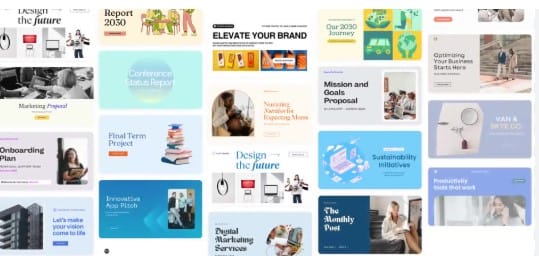
Templates: Choose from pre-designed layouts for portfolios, landing pages, and full websites.
Elements: Add icons, shapes, illustrations, stock images, or videos to make your portfolio visually appealing.
Animations: Make your website interactive and engaging with animated features.
Using Canva alongside resources like sociallif.com can provide inspiration, ideas, and tips for designing your ideal Canva portfolio website.

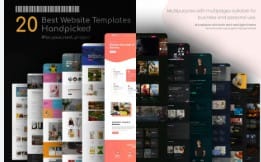
Canva website builder 2026
3. Free Stock Resources
When building a Canva portfolio website, using high-quality visuals is essential. These free stock resources can help enhance your portfolio:
Unsplash / Pexels: Access a wide range of professional, royalty-free images for your projects.
Pixabay: Download free videos and images to make your free portfolio website more engaging.
Incorporating these visuals ensures your portfolio looks professional without spending money, making it ideal for beginners using the Canva website builder 2026.
4. Domain Name Providers (Optional)
While Canva allows you to publish your free portfolio website on a Canva subdomain, having a custom URL gives your portfolio a professional edge.
Purchase a domain like
www.yourname.comfrom providers such as Namecheap or GoDaddy.Connect your domain directly to Canva using the Canva website builder 2026 features.
A custom domain is perfect for freelancers, creatives, or anyone promoting their work on platforms like sociallif.com.
5. Social Media & Contact Integration
One of the strengths of the Canva portfolio website is its ability to integrate your social and contact links:
Add buttons linking to LinkedIn, Instagram, or Twitter.
Include an email contact form for inquiries.
Make downloadable resumes or documents accessible to potential clients.
This interactivity transforms your free portfolio website into a professional online hub.
Step-by-Step Guide: Building Your Canva Portfolio Website
Follow these steps to create a professional Canva portfolio website using the Canva website builder 2026:
Step 1: Sign Up and Choose a Template
Sign up for Canva using your email or Google account.
Search for “Portfolio Website” in Canva’s template library.
Pick a template that matches your style, profession, and portfolio goals.
Step 2: Customize the Homepage
Add your name, profession, and a catchy tagline.
Insert a high-quality image or logo to establish your brand.
Include a Call-to-Action (CTA) like “Hire Me” or “View My Work.”
Step 3: Create Your Portfolio Pages
Projects Page: Display your work with images, detailed descriptions, and links.
About Page: Share your background, skills, and personal story.
Contact Page: Include email, social links, or a contact form for inquiries.
Optional Pages: Add testimonials, blogs, or client reviews to enhance credibility.
10 Free Tools to Create Subtitles Automatically
Step 4: Add Interactive Elements
Add navigation buttons for easy browsing.
Embed videos or slideshows to make your Canva portfolio website dynamic.
Link to social profiles or downloadable resumes for user engagement.
Step 5: Optimize for Mobile
The Canva website builder 2026 automatically adjusts your portfolio for mobile and tablet devices.
Preview your site to ensure all elements display correctly on different screens.

How to Use Canva to Make Free Portfolio Website 2026
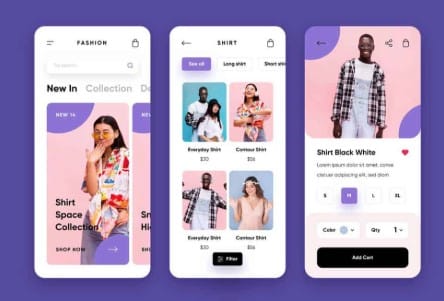
Step 6: Publish Your Canva Portfolio Website
Once your Canva portfolio website is ready, it’s time to make it live:
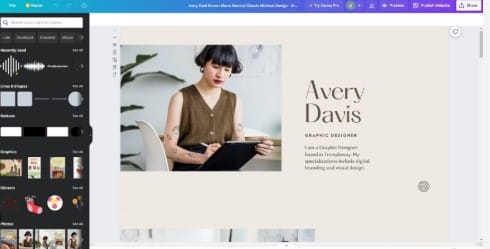
Click Publish Website in the Canva editor.
Choose a Free Domain (for example,
username.canva.site) to host your free portfolio website at no cost, or connect a custom domain for a more professional look.Share your website link on platforms like social media, email signatures, resumes, and even on sociallif.com to showcase your work and attract potential clients.
Using the Canva website builder 2026, publishing a professional online portfolio is now faster and easier than ever, allowing you to start building your online presence immediately.

Canva website builder 2026
Canva vs Other Portfolio Builders: 2026 Comparison Table
| Feature | Canva | Wix | WordPress | Adobe Portfolio | Squarespace |
|---|---|---|---|---|---|
| Ease of Use | ⭐⭐⭐⭐⭐ | ⭐⭐⭐⭐ | ⭐⭐ | ⭐⭐⭐⭐ | ⭐⭐⭐⭐ |
| Free Plan | Yes | Yes | Yes | Limited Free | No |
| Templates Available | 1000+ | 500+ | Thousands via themes | 20+ | 100+ |
| Drag & Drop | Yes | Yes | No | Limited | Yes |
| Mobile-Friendly | Yes | Yes | Depends on theme | Yes | Yes |
| Custom Domain | Optional Paid | Paid | Paid | Paid | Paid |
| Ease of Adding Portfolio | ⭐⭐⭐⭐⭐ | ⭐⭐⭐⭐ | ⭐⭐ | ⭐⭐⭐⭐ | ⭐⭐⭐⭐ |
Verdict: Canva is best for beginners seeking simplicity, speed, and free hosting. Other platforms may offer more customization but often require subscriptions or coding knowledge.
Bonus Tips to Make Your Canva Portfolio Website Stand Out
Creating a Canva portfolio website is easy with the Canva website builder 2026, but making it truly impressive requires some strategic touches. Follow these tips to enhance your free portfolio website:
Consistency is Key: Use uniform fonts, colors, and layouts across all pages to create a cohesive and professional look.
Showcase Your Best Work First: Highlight your top projects at the beginning; prioritize quality over quantity to impress visitors immediately.
Add Testimonials: Including client feedback or endorsements builds credibility and attracts potential clients.
Use Canva Animations Sparingly: While animations can make your Canva portfolio website engaging, overuse can distract visitors.
Regularly Update Your Portfolio: Keep your free portfolio website fresh by adding new projects, skills, and achievements frequently.
SEO Optimization: Incorporate relevant keywords in page titles, descriptions, and headings to boost your portfolio’s visibility online and make it easier for people to discover via platforms like sociallif.com.
By following these tips, your Canva portfolio website will not only look professional but also attract the right audience and opportunities.

5. Monetization Strategies free portfolio website

Real-Life Examples: Canva Portfolio Website Success Stories
Seeing how others have succeeded can inspire you to build your own Canva portfolio website using the Canva website builder 2026. Here are some real-life examples of professionals who created a free portfolio website that boosted their careers:
Example 1: Freelance Graphic Designer
Problem: Needed a portfolio quickly to attract new clients.
Solution: Used Canva to create a 5-page Canva portfolio website in just 2 days.
Outcome: Landed three new clients within a week by sharing the portfolio link on LinkedIn, Instagram, and platforms like sociallif.com.
Example 2: Photographer
Problem: Traditional website builders were too complicated and time-consuming.
Solution: Built a free portfolio website using Canva’s photo gallery templates in the Canva website builder 2026.
Outcome: The portfolio became a referral tool; clients could easily browse galleries and book sessions online.
Use Free AI Voice Generators Without Watermark 2026
Common Mistakes to Avoid When Creating Your Canva Portfolio Website
Creating a Canva portfolio website using the Canva website builder 2026 is straightforward, but ensuring your free portfolio website looks professional requires avoiding some common pitfalls. Here’s what to watch out for:
Overloading with Content: Keep your portfolio clean and well-organized. Too much information can overwhelm visitors and dilute the impact of your best projects.
Ignoring Mobile Users: A large portion of users will view your portfolio on mobile devices. Always preview your Canva portfolio website on different screen sizes to ensure it displays correctly.
Weak Call-to-Action: Make it clear how visitors can contact you, hire your services, or explore your work further. Strong CTAs increase engagement and potential opportunities.
Low-Quality Images: Using pixelated or blurry visuals can make your portfolio look unprofessional. Always use high-resolution images to showcase your work effectively.
Outdated Projects: Regularly update your free portfolio website with your latest projects, skills, and achievements to keep it fresh and relevant.
By learning from these common mistakes, you can build a Canva portfolio website that stands out, attracts clients, and leaves a lasting impression. Platforms like sociallif.com often highlight Canva portfolios as excellent examples of free, professional online portfolios that effectively showcase your work using the Canva website builder 2026.
Frequently Asked Questions (FAQs) About Canva Portfolio Websites
Building a professional online portfolio can raise a lot of questions, especially if you’re new to web design. Here’s a detailed FAQ section to help you create a Canva portfolio website using the Canva website builder 2026, whether you want a free portfolio website or a premium one.
Q1: Can I use Canva to create a fully professional portfolio?
Yes! The Canva website builder 2026 is designed to help both beginners and professionals build visually appealing, mobile-friendly, and fully functional portfolios. Unlike traditional website builders that require coding knowledge, Canva offers a drag-and-drop interface that allows you to:
Add and arrange images, videos, and text effortlessly.
Use pre-made templates specifically designed for portfolios.
Customize every aspect of your site, from fonts and colors to interactive elements.
Ensure your Canva portfolio website looks great on mobile, tablet, and desktop devices.
Many creatives and freelancers have used Canva to launch professional portfolios quickly. For instance, uploading your projects and linking your social media profiles or resume can make your free portfolio website stand out to potential clients, recruiters, or collaborators. Platforms like sociallif.com often highlight Canva as a top tool for beginners building their first professional online portfolio.
Even advanced users appreciate Canva for speed and simplicity. Whether you are a designer, writer, photographer, or marketer, a Canva portfolio website can serve as your personal brand hub without requiring extensive technical knowledge.
Q2: Is Canva free for portfolio websites?
Absolutely! Canva provides a free portfolio website option, which is ideal if you are just starting out or want to test your online presence. With a free plan, you can:
Use a Canva subdomain (e.g.,
username.canva.site) for hosting your portfolio.Access hundreds of templates, design elements, and stock images.
Publish and share your portfolio instantly on social media, resumes, or platforms like sociallif.com.
While the free plan is powerful, Canva also offers premium options for users who want:
A custom domain like
www.yourname.com.Advanced animations and design features.
Unlimited storage and premium stock images.
Analytics tools to track portfolio engagement.
Even with the free plan, your Canva portfolio website can look professional and attract clients. The key is to focus on a clean design, highlight your best projects, and keep the content updated.
Q3: Can I connect my own domain to Canva?
Yes! If you want your Canva portfolio website to appear more professional, you can connect a custom domain through Canva’s paid plan. A custom domain provides:
Better branding and credibility for clients or employers.
Easier sharing across business cards, emails, and social media.
Integration with tools like Google Analytics to monitor website performance.
Once you purchase a domain from providers like Namecheap or GoDaddy, you can link it directly to your Canva website in minutes. This feature is especially helpful if you’re promoting your portfolio on platforms like sociallif.com, as a professional URL helps establish trust and improves visibility.
Free Tools to Create Animated Videos for TikTok 2026
Q4: How often should I update my portfolio?
Maintaining a free portfolio website or a professional Canva portfolio website requires consistent updates to keep it relevant. Experts recommend:
Updating your portfolio every 3–6 months.
Adding new projects or achievements immediately after completion.
Removing outdated work that no longer reflects your skills or style.
Refreshing images, text, and layout to match current design trends.
Keeping your portfolio up to date ensures it always showcases your latest projects and abilities. A well-maintained Canva portfolio website will impress clients, recruiters, and collaborators, and help you stay ahead in competitive industries.
Q5: Can I track visitors to my Canva portfolio website?
Yes! Tracking your website’s visitors can help you understand engagement and improve your portfolio’s performance. The Canva website builder 2026 provides built-in analytics tools (Pro plan) and allows integration with Google Analytics.
By tracking visitors, you can:
See which portfolio pages get the most attention.
Identify where your audience comes from (social media, search engines, or referrals).
Determine which projects or sections attract potential clients.
Optimize your portfolio design and content based on real user behavior.
Even with a free portfolio website, basic engagement metrics from Canva can help you refine your portfolio and make data-driven improvements.
Conclusion: Why Canva Is the Best Choice for Your Portfolio Website in 2026
Creating a Canva portfolio website in 2026 has never been easier. With the Canva website builder 2026, both beginners and professionals can design, customize, and publish a visually appealing online portfolio quickly and efficiently.
Whether you choose a free portfolio website or a paid plan with a custom domain, Canva provides:
Intuitive drag-and-drop design tools.
Hundreds of templates and pre-designed elements.
Mobile-friendly and fully responsive layouts.
Integration with social media, email, and other platforms like sociallif.com.
By following the steps in this guide, avoiding common mistakes, and applying bonus tips such as consistent branding and regular updates, you can create a Canva portfolio website that attracts clients, employers, and collaborators.
Key Takeaways:
Start Simple: Focus on your best work and keep the design clean.
Stay Consistent: Use uniform fonts, colors, and layouts across your portfolio.
Update Regularly: Add new projects and remove outdated content to keep your portfolio relevant.
Leverage Canva Tools: Use templates, animations, and interactive elements wisely.
Promote Your Portfolio: Share your free portfolio website on social media, resumes, and platforms like sociallif.com.
With Canva, your professional website is just a few clicks away. Whether you are launching your first portfolio or updating an existing one, the Canva website builder 2026 makes it fast, easy, and accessible for everyone.