
How to Record Voiceovers on Mobile free 2026
Introduction
When I first thought about creating professional voiceovers on mobile, I assumed I would need expensive microphones, complex software, or a full recording studio. But in 2026, that’s no longer the case. With just your smartphone and the right mobile voice recording app, you can produce studio-quality audio for YouTube Shorts, TikToks, podcasts, online courses, or even freelance gigs—all for free.
Every day, students, freelancers, and content creators are discovering how to record voiceovers on mobile that sound crisp, clear, and professional. Whether you want to narrate videos, create faceless content, or offer voiceover services online, your phone alone is enough to get started.
In this complete guide, we’ll cover:
Why professional voiceovers on mobile are important
Key features to look for in a mobile voice recording app
Step-by-step instructions on how to record voiceovers on phone
A detailed comparison of the top free apps
Bonus tips to enhance your recordings
Real-life success stories and examples
Common mistakes to avoid and FAQs
Monetization strategies for your voiceover skills
By the end of this guide, you’ll know exactly how to record voiceovers on mobile like a professional—using only your phone.
Why Professional Voiceovers on Mobile Matter
High-quality audio is the foundation of engaging content. Whether you’re producing a YouTube video, TikTok reel, podcast, or online course, professional voiceovers on mobile can dramatically improve the quality of your content. Here’s why you should focus on mastering them:
Better Viewer Retention: Clear and crisp audio keeps your audience watching and listening longer.
Enhanced Professionalism: Well-produced voiceovers on mobile elevate your content and make your brand look polished.
Monetization Potential: Freelancers and creators can earn money on Fiverr, Upwork, or directly with clients by delivering high-quality mobile-recorded voiceovers.
Faceless Content Creation: Recording voiceovers on mobile allows you to create engaging content without appearing on camera.
Global Reach: Many mobile voice recording apps support multilingual recording, helping you reach audiences worldwide.
Key Features to Look for in a Mobile Voice Recording App
If you want to record voiceovers on mobile that sound professional, choosing the right mobile voice recording app is crucial. Make sure your app includes these features:
100% Free Plan Availability: Essential tools should be free so you can get started immediately.
No Watermark: Ensure your recordings are clean and watermark-free.
Noise Reduction and Voice Enhancement: Automatic improvements make your recordings sound professional without extra effort.
Trimming and Editing Tools: Edit mistakes and refine your voiceovers directly on your phone.
Multi-Format Export Options: Save recordings in MP3, WAV, or other formats for flexibility.
Mobile-Friendly Interface: Easy navigation ensures you can record voiceovers on mobile quickly and efficiently.
By focusing on these features, your workflow becomes smoother, faster, and your professional voiceovers on mobile will sound polished and high-quality.

Key Features
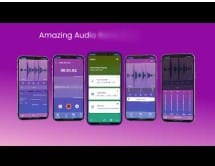
Top 10 Free Mobile Apps to Record Professional Voiceovers
If you want to record voiceovers on mobile that sound polished and professional, choosing the right mobile voice recording app is key. Here’s a detailed guide to the best free apps in 2026, including their pros, cons, and tips:
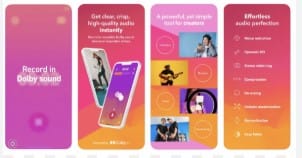
1. Dolby On (iOS & Android) – Studio-Quality Voiceovers in One Tap
Dolby On is a powerful mobile voice recording app that automatically enhances your voice using built-in noise reduction, compression, and EQ. It’s ideal for creators who want to produce professional voiceovers on mobile without complicated setups.
Pros: One-tap recording, AI-enhanced audio, no watermark
Cons: No multi-track editing
Tip: Perfect for YouTube Shorts, tutorials, or short narrations. This app is also excellent if you’re just learning how to record voiceovers on phone efficiently.
2. Rev Voice Recorder (iOS & Android) – Simple, Reliable Voiceovers on Mobile
Rev Voice Recorder is a straightforward mobile voice recording app designed for creators who want to record voiceovers on mobile quickly and without hassle. Its clean interface keeps the focus on your voice, making it easy to produce professional voiceovers on mobile even if you’re just starting.
Pros: Unlimited recordings, easy-to-use editing tools
Cons: Cannot add background music
Tip: Ideal for students, beginners, or anyone learning how to record voiceovers on phone for lectures, narrations, or quick projects.
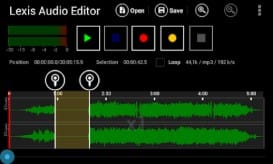
3. Lexis Audio Editor (iOS & Android) – Your Pocket-Sized Studio
Lexis Audio Editor transforms your smartphone into a mini audio studio, allowing you to record professional voiceovers on mobile with precise control. Features like equalizer adjustments, noise gate, and trimming give you the tools to polish every recording. While there’s a slight learning curve, mastering Lexis ensures your mobile voice recording app delivers top-quality results.
Pros: Advanced audio editing, no watermark
Cons: Slight learning curve for beginners
Tip: Perfect for creators who want full control over their recordings and want to master how to record voiceovers on phone with professional-level quality.
4. Smart Recorder (Android) – Lightweight and Clear Voiceovers
Smart Recorder is a simple yet powerful mobile voice recording app that lets you record voiceovers on mobile efficiently. Its minimalist design keeps the focus on capturing clear, crisp audio while keeping file sizes small, making it ideal for quick projects.
Pros: Lightweight app, clear recordings, no watermark
Cons: Limited editing features
Tip: Perfect for short narrations, quick voice notes, or when learning how to record voiceovers on phone without extra complexity.
5. BandLab (iOS & Android) – Multi-Track Voiceovers on Mobile
BandLab isn’t just for music; it’s a versatile mobile voice recording app that allows you to layer voiceovers, mix in music, and produce professional voiceovers on mobile. With multi-track support, it’s ideal for podcasters, explainer videos, or content that needs background audio.
Pros: Multi-track audio mixing, mobile-friendly interface
Cons: Primarily designed for musicians
Tip: Excellent for creators who want to learn how to record voiceovers on phone with added music or layered effects.

6. Easy Voice Recorder (iOS & Android) – Beginner-Friendly Voiceovers on Mobile
Easy Voice Recorder is one of the simplest mobile voice recording apps available, perfect for anyone just starting to record voiceovers on mobile. Open the app, hit record, and save your audio—no complicated setup required. It’s ideal for learning how to record voiceovers on phone quickly and efficiently.
Pros: Straightforward interface, no setup needed
Cons: Limited editing options
Tip: Best for beginners, simple narration projects, or quick recordings when you need professional voiceovers on mobile without a learning curve.
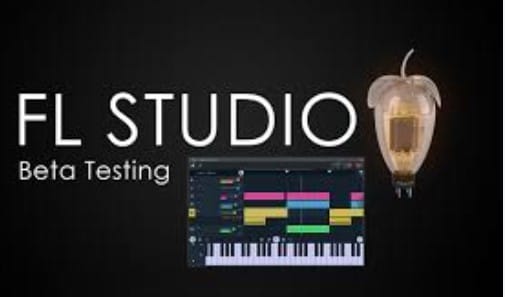
7. FL Studio Mobile (iOS & Android) – Advanced Mobile Voiceover Studio
FL Studio Mobile is a powerful mobile voice recording app designed for creators who want to produce professional voiceovers on mobile with studio-level effects. Its free trial allows you to experiment with advanced audio tools, mixing, and sound effects to create high-quality samples for client work.
Pros: Studio-level features, advanced audio effects
Cons: Free trial is limited
Tip: Use the trial to create high-quality voiceover samples for Fiverr, Upwork, or other freelance opportunities while mastering how to record voiceovers on phone professionally.
8. WaveEditor (Android) – Visual Editing for Professional Voiceovers on Mobile
WaveEditor is a versatile mobile voice recording app that allows you to see your audio waveform, making precise edits easy and intuitive. It’s perfect for creators who want full control when learning how to record voiceovers on phone and produce professional voiceovers on mobile.
Pros: Visual waveform editing, supports multiple formats
Cons: Interface may be slightly confusing for beginners
Tip: Ideal for users who want hands-on control over every detail of their recordings.
9. AudioLab (Android) – Creative and Fun Voiceovers on Mobile
AudioLab is a mobile voice recording app designed for creators who want to experiment with voice effects, text-to-speech, or background music. It’s perfect for making engaging TikToks, Reels, or YouTube intros while learning how to record voiceovers on phone creatively.
Pros: Multi-functional, includes creative effects, free version available
Cons: Ads in the free version
Tip: Best for content creators adding personality or fun elements to professional voiceovers on mobile.
10. Hi-Q MP3 Voice Recorder (Android) – High-Quality Voiceovers on Mobile
Hi-Q MP3 Voice Recorder is a mobile voice recording app that produces high-quality MP3 recordings, making it ideal for podcasts, long-form narrations, or professional voiceover projects. This app ensures your professional voiceovers on mobile are crisp and clear.
Pros: High-quality audio, no watermark
Cons: Limited editing features
Tip: Perfect for long-form content creators and anyone learning how to record voiceovers on phone for professional projects.
Comparison Table of Top Mobile Voiceover Apps
| Tool | Best For | Watermark-Free | Audio Enhancement |
|---|---|---|---|
| Dolby On | Auto-enhanced recordings | Yes | Yes |
| Rev Voice Recorder | Simple voice captures | Yes | No |
| Lexis Audio Editor | Detailed editing | Yes | Yes |
| Smart Recorder | Lightweight voiceovers | Yes | No |
| BandLab | Multi-track mixing | Yes | Yes |
| Easy Voice Recorder | Beginners/simple use | Yes | No |
| FL Studio Mobile | Studio-level audio | Yes (Trial) | Yes |
| WaveEditor | Waveform editing | Yes | No |
| AudioLab | Creative effects | Yes | Yes |
| Hi-Q Recorder | High-quality MP3 output | Yes | No |
Tips: Beginners should start with Dolby On or Easy Voice Recorder. Advanced users can explore Lexis Audio Editor or BandLab for multi-track projects.
Step-by-Step Guide: How to Record Voiceovers on Phone Using Dolby On
If you want to record voiceovers on mobile that sound polished and professional, Dolby On is one of the best mobile voice recording apps to start with. Follow these simple steps:
Download the Dolby On app from your iOS or Android app store.
Open the app and tap the Record button.
Speak clearly near your phone’s built-in microphone for optimal clarity.
Stop the recording and let Dolby’s AI automatically enhance your audio for professional results.
Save or export your recording in your preferred format, such as MP3 or WAV.
By following these steps, you can quickly produce professional voiceovers on mobile without additional equipment.
Monetization Strategies Using Mobile Voiceovers
Once you master how to record voiceovers on phone with clarity and precision, you can turn your skills into income. Here are some effective strategies:
Sell voiceovers on Fiverr and Upwork: Offer your services as a freelancer using recordings from your mobile voice recording app.
Start a faceless YouTube Shorts or TikTok channel: Use professional voiceovers on mobile to narrate engaging content without appearing on camera.
Create educational content or online courses: Enhance tutorials and lessons with high-quality voice recordings.
Offer audiobook narration services: Record books or stories using your smartphone and sell them online.
Produce podcasts or explainer videos: Create polished audio content entirely from your mobile device.
With consistent practice and the right mobile voice recording app, you can record voiceovers on mobile that generate a steady income stream—all without expensive studio equipment.
Bonus Tips and Best Practices for Recording Voiceovers on Mobile
Mastering how to record voiceovers on phone isn’t just about picking the right mobile voice recording app. Following best practices can make your recordings sound polished and professional.
Common Mistakes to Avoid
Recording in noisy environments: Background noise reduces the quality of your professional voiceovers on mobile.
Speaking too fast or mumbling: Clear and steady speech improves listener engagement.
Skipping editing or trimming errors: Even minor mistakes can make recordings sound unprofessional.
Best Practices for Professional Voiceovers on Mobile
Record in a quiet room: Minimize distractions and ambient noise.
Speak clearly and at a moderate pace: Helps ensure your voiceover is easily understood.
Keep your phone’s microphone close (without covering it): Optimizes audio capture when you record voiceovers on mobile.
Use noise reduction or AI enhancement features: Apps like Dolby On automatically improve audio quality.
Preview and edit before publishing: Always check your recordings to maintain professional voiceovers on mobile.
Real-Life Example: Freelancing Success Story
Ahsan’s Journey:
Ahsan, a 22-year-old student from Karachi, mastered how to record voiceovers on phone using Dolby On and edited his recordings with BandLab, a powerful mobile voice recording app. Within just three months, he earned $700 on Fiverr and Upwork—entirely with his smartphone and free apps.
His story proves that you don’t need expensive microphones or a studio to create professional voiceovers on mobile. With the right apps, consistency, and practice, anyone can produce high-quality audio and turn it into a source of income.

Frequently Asked Questions (FAQs)
1. Are mobile voice recording apps really free?
Yes! Many mobile voice recording apps, including Dolby On, Rev Voice Recorder, and Lexis Audio Editor, offer completely free versions. Paid upgrades are optional, but you can produce professional voiceovers on mobile without spending a dime.
2. Can I make money recording voiceovers from my phone?
Absolutely. Freelancers can sell mobile-recorded voiceovers on Fiverr, Upwork, or directly to clients. Learning how to record voiceovers on phone professionally can open multiple income streams.
3. Which app is easiest for beginners?
Dolby On and Easy Voice Recorder are excellent for beginners. These mobile voice recording apps are simple, intuitive, and make it easy to record voiceovers on mobile without a steep learning curve.
4. How can I improve sound quality?
To produce professional voiceovers on mobile, record in a quiet environment, speak clearly at a steady pace, and use noise reduction or AI enhancement features. Editing apps like Lexis Audio Editor can further polish your recordings.
5. Are mobile-recorded voiceovers good enough for YouTube and freelancing?
Yes! High-quality mobile-recorded voiceovers are widely accepted for YouTube, TikToks, podcasts, and freelance projects. Clear, well-edited audio is considered professional.
6. Can I record voiceovers in multiple languages?
Yes. You can record voiceovers on mobile in any language your audience requires, expanding your reach and freelance opportunities globally.
7. Do I need extra equipment to record professional voiceovers on mobile?
Not necessarily. Modern smartphones have high-quality microphones, and apps like Dolby On automatically enhance your audio. Optional accessories, like clip-on mics, can improve quality further, but you can achieve professional voiceovers on mobile without them.
Conclusion
Learning how to record voiceovers on phone has never been easier. Today, you can create professional voiceovers on mobile using just your smartphone and free mobile voice recording apps like Dolby On, Lexis Audio Editor, and BandLab. These tools let you produce studio-quality audio for YouTube, TikTok, podcasts, online courses, or freelance projects—without spending a single dollar.
Whether you’re a beginner, student, content creator, or freelancer, your smartphone is a powerful tool to record voiceovers on mobile with clarity and precision. By choosing the right app, following best practices, and using features like noise reduction and editing tools, you can ensure your recordings sound polished and professional.
The key to success is consistent practice. Experiment with different mobile voice recording apps, test your voice levels, and refine your recordings until you achieve the quality you want. Over time, these simple recordings can become fully professional voiceovers on mobile that stand out in videos, courses, or client projects.
Don’t wait to get started—pick an app, start recording, and explore your creativity. With dedication, the skills you develop while learning how to record voiceovers on phone can become a source of income, a way to grow your content, or a valuable freelancing service.
Your smartphone isn’t just for calls or social media—it’s a complete studio in your pocket. Start today, and transform your mobile recordings into professional audio that engages listeners and opens doors to new opportunities.
I don’t think the title of your article matches the content lol. Just kidding, mainly because I had some doubts after reading the article.